 |
| Clay-colored Sparrow nest found 22 June 2014. |
Saturday, June 28, 2014


Tuesday, June 17, 2014
Field work interlude
Field work has been quite busy lately, but I'm working on the next post in the Sokal and Rohlf stats/R series.
Have a prairie picture in the meantime!
Have a prairie picture in the meantime!
 |
| A Savannah Sparrow on the Alberta prairie. |
Saturday, May 31, 2014
Using R to work through Sokal and Rohlf's Biometry: Chapter 2 (Data in Biology) and Chapter 3 (Computers and Data Analysis)
Previously in this series: a quick summary of Chapter 1 in Sokal and Rohlf's Biometry. Chapter 2 goes through topics of data in biology; Chapter 3 discusses "computers and data analysis". (I won't worry about this short chapter, as it contains a short description of computing, software, and efficiency in about six pages). I'm not going to re-summarize everything in the book in detail. Instead I will focus more on how to demonstrate concepts in R or implement techniques they are describing in R. In other words, this will mostly be about how to go from the theory to implementation.
individual<-c(1:9)
color<-c("blue","red","blue","green","blue","red","red","green","green")
length<-c(7.2, 9.7, 8.3, 10, 8.1, 11.6, 12, 9.8, 11)
numbereggs<-c(1,3,2,4,2,4,5,3,4)
dataset<-data.frame(individual,color,length,numbereggs)
str(dataset)
#'data.frame': 9 obs. of 4 variables:
#$ individual: int 1 2 3 4 5 6 7 8 9
#$ color : Factor w/ 3 levels "blue","green",..: 1 3 1 2 1 3 3 2 2
#$ length : num 7.2 9.7 8.3 10 8.1 11.6 12 9.8 11
#$ numbereggs: num 1 3 2 4 2 4 5 3 4
#Notice that individual is an integer, as it was created 1:9.
#If these numbers were tag numbers, or something where you might later add identifying letters,
#you can convert it to a factor.
dataset$individual.f<-factor(dataset$individual)
str(dataset)
#'data.frame': 9 obs. of 5 variables:
# $ individual : int 1 2 3 4 5 6 7 8 9
#$ color : Factor w/ 3 levels "blue","green",..: 1 3 1 2 1 3 3 2 2
#$ length : num 7.2 9.7 8.3 10 8.1 11.6 12 9.8 11
#$ numbereggs : num 1 3 2 4 2 4 5 3 4
#$ individual.f: Factor w/ 9 levels "1","2","3","4",..: 1 2 3 4 5 6 7 8 9
#Hmm, number eggs is still counted as a number. What if we need it as an integer?
dataset$numbereggs.int<-as.integer(dataset$numbereggs)
#I always put it in a new column in case I mess something up, I still have the original data.
str(dataset)
#'data.frame': 9 obs. of 6 variables:
# $ individual : int 1 2 3 4 5 6 7 8 9
#$ color : Factor w/ 3 levels "blue","green",..: 1 3 1 2 1 3 3 2 2
#$ length : num 7.2 9.7 8.3 10 8.1 11.6 12 9.8 11
#$ numbereggs : num 1 3 2 4 2 4 5 3 4
#$ individual.f : Factor w/ 9 levels "1","2","3","4",..: 1 2 3 4 5 6 7 8 9
#$ numbereggs.int: int 1 3 2 4 2 4 5 3 4
#numbereggs.int is now an integer.
#So, even if R doesn't correctly read your data the first time,
#you can finagle it into the right format for any analyses.
There are also the scales of measurement. Nominal scales do not have an implied ordering. For example, sites might not need an ordering. Or, there might be a directional ordering that is not evident from the site name (which R would automatically order alphabetically).
#Create a site variable.
dataset$site<-c("Texas","Oklahoma","South Dakota", "Manitoba", "Kansas","Oklahoma","South Dakota", "Manitoba", "Iowa")
str(dataset$site)
#chr [1:9] "Texas" "Oklahoma" "South Dakota" "Manitoba" "Kansas" "Oklahoma" "South Dakota" "Manitoba" "Iowa"
#It lists them as characters ("chr"), which can be useful sometimes (some functions will give errors if you have factors
#versus characters, so knowing how to convert is useful.)
dataset$site.f<-as.factor(dataset$site)
str(dataset$site.f)
#Factor w/ 6 levels "Iowa","Kansas",..: 6 4 5 3 2 4 5 3 1
#Note that it represents them as numbers, which is part of the reason it's sometimes useful to leave things as factors.
#1 is Iowa and Texas is 6, so it is ordered alphabetically.
#If you want to go from factor to character, use as.character
dataset$site.chr<-as.character(dataset$site.f)
str(dataset$site.chr)
#Anyway, to change the order on our factors, we need to use levels and factor.
levels.site<- c("Texas","Oklahoma","Kansas", "Iowa", "South Dakota", "Manitoba")
dataset$site.f.ordered<-factor(dataset$site.f, levels=levels.site, ordered=TRUE)
str(dataset$site.f.ordered)
#Now it's a categorical/ordinal variable in order from south to north!
# Ord.factor w/ 6 levels "Texas"<"Oklahoma"<..: 1 2 5 6 3 2 5 6 4
#For significant digits:
signif(dataset$length, digits=1)
#For simple rounding, digits is the number of decimal places.
round(dataset$length, digits=0)
round(dataset$length, digits=-1)
dataset$eggsperlength<-dataset$numbereggs/dataset$length
#Divide one variable by another and assign it to a new variable
#within a dataframe to get a ratio variable.
#A frequency table can be created using table().
color.freqs<-table(dataset[,"color"])
#This is equivalent to Table 2.1 showing a qualitative frequency distribution.
#For a quantitative frequency distribution of a
#meristic (discontinuous) variable (as in Table 2.2), do the same thing.
length.freqs<-table(dataset[,"numbereggs"])
#For quantitative frequency distributions of continuous variables,
#Box 2.1 explains how to classify by classes.
#We'll use their data this time.
aphid.femur<-c(3.8,3.6,4.3,3.5,4.3,
3.3,4.3,3.9,4.3,3.8,
3.9,4.4,3.8,4.7,3.6,
4.1,4.4,4.5,3.6,3.8,
4.4,4.1,3.6,4.2,3.9)
#How about the tables?
table(aphid.femur)
#This reproduces the original frequency distribution but omits the zeroes.
#A google search for brings us to this website:
#http://www.r-tutor.com/elementary-statistics/quantitative-data/frequency-distribution-quantitative-data
hist(aphid.femur,
breaks=seq(from=3.25, to=4.85, by=0.1),
col="gray",
main="",
xlab="Femur length in mm",
ylim=c(0,10)) #This is so we can add the second graph on next.
hist(aphid.femur,
breaks=seq(from=3.25, to=4.85, by=0.3),
main="",
add=TRUE)
#I found this website helpful when learning to make the histograms:
#http://www.r-bloggers.com/basics-of-histograms/
#Additionally, you can just uses breaks=n, where n is the number of breaks you want,
#instead of specifying as I did above to create the figure as in Box 2.1.
#Stem-and-leaf displays can also show the distribution of data.
stem(dataset$length, scale = 1, width = 100, atom = 1e-08)
#Changing scale makes the plot expanded or squished together.
#Scale=1 seems best for making a stem-and-leaf plot as you would by hand.
#width is "Desired width of the plot" according to help. I am not entirely sure what it does.
#When I make it too small, numbers on the right side of the stem disappear. Making it larger
#doesn't change anything but add those back.
#Back-to-back stem-and-leaf plots are discussed on page 29
#as a way to compare two samples.
#Base R does not include a way to do these, but a quick google search shows
#http://cran.r-project.org/web/packages/aplpack/index.html
#Bar diagrams (or bar plots) are for meristic (discontinuous) variables.
#Let's the frequency table we made above because barplot requires a frequency table.
barplot(color.freqs,
ylab="Count",
xlab="Color")
#We have three of each, so let's
#try it again with something more complicated:
site.freqs<-table(dataset[,"site.f.ordered"])
barplot(site.freqs,
ylab="Count",
xlab="Sites south to north")
#Instead of bars to represent a continuous distribution, as in a histogram,
#there is also the frequency polygon.
#Let's look at the histogram for five classes again and make the polygon like that.
hist(aphid.femur,
breaks=seq(from=3.25, to=4.85, by=0.3),
main="5 classes",
xlab="Femur length in mm",
add=FALSE)
#We'll need to load the ggplot2 library.
library(ggplot2)
#And make the aphid.femur data into a dataframe.
aphid.df<-data.frame(aphid.femur)
ggplot(aphid.df, aes(x = aphid.femur)) +
geom_freqpoly(binwidth=0.1) +
theme(
panel.background = element_blank(),
panel.grid = element_blank(), #These theme lines get rid of the standard gray background in ggplot
axis.line = element_line() #and this returns the axis lines that removing the grid also removes.
)+
labs(x = "Aphid femur in mm", y = "Frequency")
#Finally, dot plots (examples in Figures 2.1a and 2.1b for two different sample sizes).
#While R often automatically plots dots with plot(), it doesn't necessarily give us the frequency plot we want.
plot(aphid.femur)
#See, the figure is in order of "Index", which is the order of the points in the dataset.
#It doesn't seem quite possible to make a figure just like the one in the book,
#but we can get pretty close.
stripchart(aphid.femur,
method="stack",
at=0,
xlab="Aphid femur in mm",
ylab="Frequency")
#This is nice, but doesn't show the frequency counts.
plot(sort(aphid.femur),
sequence(table(aphid.femur)),
cex=2.5,
pch=21,
bg="black", #these three lines make the dots larger and filled, hence easier to see.
xlab="Aphid femur in mm",
ylab="",
yaxt="n") #suppress the y-axis or it'll put decimal places.
mtext(side = 2, #left side (y-axis)
las=1, #rotate the axis title so it's horizontal.
expression(italic(f)), #make the f italicized as in Figure 2.1, just for an example.
cex=1.5, #increase size of the label.
line=2) #if it's at 1 it sits right on the axis where it's hard to read. Adjust as needed.
axis(side=2,
las=1,
at=c(1,2,3,4)) #re-add the y-axis with integers for our counts.
#This is more like it!
#Exercise 2.2
#Round the following numbers to three significant digits.
e2.2<-c(106.55, 0.06819, 3.0495, 7815.01, 2.9149, 20.1500)
signif(e2.2, digits=3)
#[1] 1.07e+02 6.82e-02 3.05e+00 7.82e+03 2.91e+00 2.02e+01
#Then round to one decimal place.
round(e2.2, digits=1)
#[1] 106.5 0.1 3.0 7815.0 2.9 20.1
#Exercise 2.4
#Group the 40 measurements of interorbital width of a sample of pigeons.
#Frequency distribution and draw its histogram.
e2.4<-c(12.2, 12.9, 11.8, 11.9, 11.6, 11.1, 12.3, 12.2, 11.8, 11.8,
10.7, 11.5, 11.3, 11.2, 11.6, 11.9, 13.3, 11.2, 10.5, 11.1,
12.1, 11.9, 10.4, 10.7, 10.8, 11.0, 11.9, 10.2, 10.9, 11.6,
10.8, 11.6, 10.4, 10.7, 12.0, 12.4, 11.7, 11.8, 11.3, 11.1)
#Frequency distribution
table(e2.4)
#Histogram
#Used the high and low values from the frequency distribution
#to choose the breaks. Since it's one decimal place,
#the 0.1 classes seem logical.
hist(e2.4,
breaks=seq(from=10, to=13.4, by=0.1),
col="gray",
main="",
xlab="Interorbital width for domestic pigeons (mm)")
#Exercise 2.6
#Transform exercise 2.4 data with logarithms and make another frequency distribution and histogram.
e2.6<-log(e2.4) #note that R uses the natural log (ln).
table(e2.6)
#To show them in the same window, use par to set number of rows and columns visible.
par(mfrow=c(2,1))
#To compare with the same number of breaks, use length.out to specify how many breaks.
#Using the width of each class would be harder since transforming shifts the data
#to a different range of numbers.
hist(e2.4,
breaks=seq(from=min(e2.4), to=max(e2.4), length.out=15),
col="gray",
main="",
xlab="Interorbital width for domestic pigeons (mm)")
hist(e2.6,
breaks=seq(from=min(e2.6), to=max(e2.6), length.out=15),
col="gray",
main="",
xlab="Interorbital width for domestic pigeons (mm) (ln-transformed)")
#Now the data seem to be a bit more centered.
#We can't really plot them over each other like we did earlier with classes
#because the transformed values shift their range so much.
#Put the single plot back in case you want to plot more the regular way.
par(mfrow=c(1,1))
#Exercise 2.7
#Get data from exercise 4.3.
e2.7<-c(4.32, 4.25, 4.82, 4.17, 4.24, 4.28, 3.91, 3.97, 4.29, 4.03, 4.71, 4.20,
4.00, 4.42, 3.96, 4.51, 3.96, 4.09, 3.66, 3.86, 4.48, 4.15, 4.10, 4.36,
3.89, 4.29, 4.38, 4.18, 4.02, 4.27, 4.16, 4.24, 3.74, 4.38, 3.77, 4.05,
4.42, 4.49, 4.40, 4.05, 4.20, 4.05, 4.06, 3.56, 3.87, 3.97, 4.08, 3.94,
4.10, 4.32, 3.66, 3.89, 4.00, 4.67, 4.70, 4.58, 4.33, 4.11, 3.97, 3.99,
3.81, 4.24, 3.97, 4.17, 4.33, 5.00, 4.20, 3.82, 4.16, 4.60, 4.41, 3.70,
3.88, 4.38, 4.31, 4.33, 4.81, 3.72, 3.70, 4.06, 4.23, 3.99, 3.83, 3.89,
4.67, 4.00, 4.24, 4.07, 3.74, 4.46, 4.30, 3.58, 3.93, 4.88, 4.20, 4.28,
3.89, 3.98, 4.60, 3.86, 4.38, 4.58, 4.14, 4.66, 3.97, 4.22, 3.47, 3.92,
4.91, 3.95, 4.38, 4.12, 4.52, 4.35, 3.91, 4.10, 4.09, 4.09, 4.34, 4.09)
#Make a stem-and-leaf display.
stem(e2.7, scale = 1, width = 100, atom = 1e-08)
#Create an ordered array. This in R would be something like a vector,
#which is what we'll make.
e2.7.ordered<-sort(e2.7) #order is a similar function, but for dataframes.
e2.7.ordered
#You can see how it matches up with the stem-and-leaf display, as it should.
That's all for Chapters 2 and 3.
Section 2.1: samples and populations
Definitions are given for individual observations, sample of observations, variable, and population. A typical way to format data is in rows. Each row would be an individual observation. The variables are columns. The statistical population is all of the individual observations that you could possibly make (either that exist anywhere, or within your sampling area). Your sample of observations comes from this population. Generally one samples your observations from a population, but it's usually not feasible to get every individual from the population. So you end up with a dataset that is a sample of observations from a population, with the variables you've measured on each individual observation.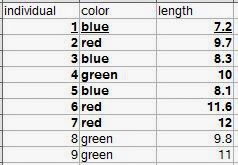 |
| Let's say all nine rows are our population. The bold observations are the sampled individuals (we were only able to measure seven). The underlined row is one individual observation. |
Section 2.2: variables in biology
They begin to discuss types of variables such as quantitative, qualitative, continuous, and discontinuous (meristic) variables. In R, you can include all these types of variables. Create a sample dataset and then look at how R categorizes them.individual<-c(1:9)
color<-c("blue","red","blue","green","blue","red","red","green","green")
length<-c(7.2, 9.7, 8.3, 10, 8.1, 11.6, 12, 9.8, 11)
numbereggs<-c(1,3,2,4,2,4,5,3,4)
dataset<-data.frame(individual,color,length,numbereggs)
str(dataset)
#'data.frame': 9 obs. of 4 variables:
#$ individual: int 1 2 3 4 5 6 7 8 9
#$ color : Factor w/ 3 levels "blue","green",..: 1 3 1 2 1 3 3 2 2
#$ length : num 7.2 9.7 8.3 10 8.1 11.6 12 9.8 11
#$ numbereggs: num 1 3 2 4 2 4 5 3 4
#Notice that individual is an integer, as it was created 1:9.
#If these numbers were tag numbers, or something where you might later add identifying letters,
#you can convert it to a factor.
dataset$individual.f<-factor(dataset$individual)
str(dataset)
#'data.frame': 9 obs. of 5 variables:
# $ individual : int 1 2 3 4 5 6 7 8 9
#$ color : Factor w/ 3 levels "blue","green",..: 1 3 1 2 1 3 3 2 2
#$ length : num 7.2 9.7 8.3 10 8.1 11.6 12 9.8 11
#$ numbereggs : num 1 3 2 4 2 4 5 3 4
#$ individual.f: Factor w/ 9 levels "1","2","3","4",..: 1 2 3 4 5 6 7 8 9
#Hmm, number eggs is still counted as a number. What if we need it as an integer?
dataset$numbereggs.int<-as.integer(dataset$numbereggs)
#I always put it in a new column in case I mess something up, I still have the original data.
str(dataset)
#'data.frame': 9 obs. of 6 variables:
# $ individual : int 1 2 3 4 5 6 7 8 9
#$ color : Factor w/ 3 levels "blue","green",..: 1 3 1 2 1 3 3 2 2
#$ length : num 7.2 9.7 8.3 10 8.1 11.6 12 9.8 11
#$ numbereggs : num 1 3 2 4 2 4 5 3 4
#$ individual.f : Factor w/ 9 levels "1","2","3","4",..: 1 2 3 4 5 6 7 8 9
#$ numbereggs.int: int 1 3 2 4 2 4 5 3 4
#numbereggs.int is now an integer.
#So, even if R doesn't correctly read your data the first time,
#you can finagle it into the right format for any analyses.
There are also the scales of measurement. Nominal scales do not have an implied ordering. For example, sites might not need an ordering. Or, there might be a directional ordering that is not evident from the site name (which R would automatically order alphabetically).
#Create a site variable.
dataset$site<-c("Texas","Oklahoma","South Dakota", "Manitoba", "Kansas","Oklahoma","South Dakota", "Manitoba", "Iowa")
str(dataset$site)
#chr [1:9] "Texas" "Oklahoma" "South Dakota" "Manitoba" "Kansas" "Oklahoma" "South Dakota" "Manitoba" "Iowa"
#It lists them as characters ("chr"), which can be useful sometimes (some functions will give errors if you have factors
#versus characters, so knowing how to convert is useful.)
dataset$site.f<-as.factor(dataset$site)
str(dataset$site.f)
#Factor w/ 6 levels "Iowa","Kansas",..: 6 4 5 3 2 4 5 3 1
#Note that it represents them as numbers, which is part of the reason it's sometimes useful to leave things as factors.
#1 is Iowa and Texas is 6, so it is ordered alphabetically.
#If you want to go from factor to character, use as.character
dataset$site.chr<-as.character(dataset$site.f)
str(dataset$site.chr)
#Anyway, to change the order on our factors, we need to use levels and factor.
levels.site<- c("Texas","Oklahoma","Kansas", "Iowa", "South Dakota", "Manitoba")
dataset$site.f.ordered<-factor(dataset$site.f, levels=levels.site, ordered=TRUE)
str(dataset$site.f.ordered)
#Now it's a categorical/ordinal variable in order from south to north!
# Ord.factor w/ 6 levels "Texas"<"Oklahoma"<..: 1 2 5 6 3 2 5 6 4
Section 2.3: accuracy and precision of data
The main implementation in this section is rounding, which has a convenient function.#For significant digits:
signif(dataset$length, digits=1)
#For simple rounding, digits is the number of decimal places.
round(dataset$length, digits=0)
round(dataset$length, digits=-1)
Section 2.4: derived variables
This section is about creating variables from each other, such as ratios or rates. I'll just show how to calculate a new variable from two variables. As the section points out, you want to make sure that using a ratio or rate is actually telling you something different than the measurements themselves, and remember that they are not really continuous variables.dataset$eggsperlength<-dataset$numbereggs/dataset$length
#Divide one variable by another and assign it to a new variable
#within a dataframe to get a ratio variable.
Section 2.5: frequency distributions
This section is a brief introduction to frequency distributions. The book gets more into these in Chapters 5 and 6. They show frequencies in several ways: tabular form, histograms, bar diagrams (bar plots), frequency polygons, dot plots, and stem-and-leaf displays. I'll focus here on how to generate each of these.#A frequency table can be created using table().
color.freqs<-table(dataset[,"color"])
#This is equivalent to Table 2.1 showing a qualitative frequency distribution.
#For a quantitative frequency distribution of a
#meristic (discontinuous) variable (as in Table 2.2), do the same thing.
length.freqs<-table(dataset[,"numbereggs"])
#For quantitative frequency distributions of continuous variables,
#Box 2.1 explains how to classify by classes.
#We'll use their data this time.
aphid.femur<-c(3.8,3.6,4.3,3.5,4.3,
3.3,4.3,3.9,4.3,3.8,
3.9,4.4,3.8,4.7,3.6,
4.1,4.4,4.5,3.6,3.8,
4.4,4.1,3.6,4.2,3.9)
#How about the tables?
table(aphid.femur)
#This reproduces the original frequency distribution but omits the zeroes.
#A google search for brings us to this website:
#http://www.r-tutor.com/elementary-statistics/quantitative-data/frequency-distribution-quantitative-data
hist(aphid.femur,
breaks=seq(from=3.25, to=4.85, by=0.1),
col="gray",
main="",
xlab="Femur length in mm",
ylim=c(0,10)) #This is so we can add the second graph on next.
hist(aphid.femur,
breaks=seq(from=3.25, to=4.85, by=0.3),
main="",
add=TRUE)
#I found this website helpful when learning to make the histograms:
#http://www.r-bloggers.com/basics-of-histograms/
#Additionally, you can just uses breaks=n, where n is the number of breaks you want,
#instead of specifying as I did above to create the figure as in Box 2.1.
#Stem-and-leaf displays can also show the distribution of data.
stem(dataset$length, scale = 1, width = 100, atom = 1e-08)
#Changing scale makes the plot expanded or squished together.
#Scale=1 seems best for making a stem-and-leaf plot as you would by hand.
#width is "Desired width of the plot" according to help. I am not entirely sure what it does.
#When I make it too small, numbers on the right side of the stem disappear. Making it larger
#doesn't change anything but add those back.
#Back-to-back stem-and-leaf plots are discussed on page 29
#as a way to compare two samples.
#Base R does not include a way to do these, but a quick google search shows
#http://cran.r-project.org/web/packages/aplpack/index.html
#Bar diagrams (or bar plots) are for meristic (discontinuous) variables.
#Let's the frequency table we made above because barplot requires a frequency table.
barplot(color.freqs,
ylab="Count",
xlab="Color")
#We have three of each, so let's
#try it again with something more complicated:
site.freqs<-table(dataset[,"site.f.ordered"])
barplot(site.freqs,
ylab="Count",
xlab="Sites south to north")
#Instead of bars to represent a continuous distribution, as in a histogram,
#there is also the frequency polygon.
#Let's look at the histogram for five classes again and make the polygon like that.
hist(aphid.femur,
breaks=seq(from=3.25, to=4.85, by=0.3),
main="5 classes",
xlab="Femur length in mm",
add=FALSE)
#We'll need to load the ggplot2 library.
library(ggplot2)
#And make the aphid.femur data into a dataframe.
aphid.df<-data.frame(aphid.femur)
ggplot(aphid.df, aes(x = aphid.femur)) +
geom_freqpoly(binwidth=0.1) +
theme(
panel.background = element_blank(),
panel.grid = element_blank(), #These theme lines get rid of the standard gray background in ggplot
axis.line = element_line() #and this returns the axis lines that removing the grid also removes.
)+
labs(x = "Aphid femur in mm", y = "Frequency")
#Finally, dot plots (examples in Figures 2.1a and 2.1b for two different sample sizes).
#While R often automatically plots dots with plot(), it doesn't necessarily give us the frequency plot we want.
plot(aphid.femur)
#See, the figure is in order of "Index", which is the order of the points in the dataset.
#It doesn't seem quite possible to make a figure just like the one in the book,
#but we can get pretty close.
stripchart(aphid.femur,
method="stack",
at=0,
xlab="Aphid femur in mm",
ylab="Frequency")
#This is nice, but doesn't show the frequency counts.
plot(sort(aphid.femur),
sequence(table(aphid.femur)),
cex=2.5,
pch=21,
bg="black", #these three lines make the dots larger and filled, hence easier to see.
xlab="Aphid femur in mm",
ylab="",
yaxt="n") #suppress the y-axis or it'll put decimal places.
mtext(side = 2, #left side (y-axis)
las=1, #rotate the axis title so it's horizontal.
expression(italic(f)), #make the f italicized as in Figure 2.1, just for an example.
cex=1.5, #increase size of the label.
line=2) #if it's at 1 it sits right on the axis where it's hard to read. Adjust as needed.
axis(side=2,
las=1,
at=c(1,2,3,4)) #re-add the y-axis with integers for our counts.
#This is more like it!
Exercises 2 (selected)
I'll do the ones that I can demonstrate in R.#Exercise 2.2
#Round the following numbers to three significant digits.
e2.2<-c(106.55, 0.06819, 3.0495, 7815.01, 2.9149, 20.1500)
signif(e2.2, digits=3)
#[1] 1.07e+02 6.82e-02 3.05e+00 7.82e+03 2.91e+00 2.02e+01
#Then round to one decimal place.
round(e2.2, digits=1)
#[1] 106.5 0.1 3.0 7815.0 2.9 20.1
#Exercise 2.4
#Group the 40 measurements of interorbital width of a sample of pigeons.
#Frequency distribution and draw its histogram.
e2.4<-c(12.2, 12.9, 11.8, 11.9, 11.6, 11.1, 12.3, 12.2, 11.8, 11.8,
10.7, 11.5, 11.3, 11.2, 11.6, 11.9, 13.3, 11.2, 10.5, 11.1,
12.1, 11.9, 10.4, 10.7, 10.8, 11.0, 11.9, 10.2, 10.9, 11.6,
10.8, 11.6, 10.4, 10.7, 12.0, 12.4, 11.7, 11.8, 11.3, 11.1)
#Frequency distribution
table(e2.4)
#Histogram
#Used the high and low values from the frequency distribution
#to choose the breaks. Since it's one decimal place,
#the 0.1 classes seem logical.
hist(e2.4,
breaks=seq(from=10, to=13.4, by=0.1),
col="gray",
main="",
xlab="Interorbital width for domestic pigeons (mm)")
#Exercise 2.6
#Transform exercise 2.4 data with logarithms and make another frequency distribution and histogram.
e2.6<-log(e2.4) #note that R uses the natural log (ln).
table(e2.6)
#To show them in the same window, use par to set number of rows and columns visible.
par(mfrow=c(2,1))
#To compare with the same number of breaks, use length.out to specify how many breaks.
#Using the width of each class would be harder since transforming shifts the data
#to a different range of numbers.
hist(e2.4,
breaks=seq(from=min(e2.4), to=max(e2.4), length.out=15),
col="gray",
main="",
xlab="Interorbital width for domestic pigeons (mm)")
hist(e2.6,
breaks=seq(from=min(e2.6), to=max(e2.6), length.out=15),
col="gray",
main="",
xlab="Interorbital width for domestic pigeons (mm) (ln-transformed)")
#Now the data seem to be a bit more centered.
#We can't really plot them over each other like we did earlier with classes
#because the transformed values shift their range so much.
#Put the single plot back in case you want to plot more the regular way.
par(mfrow=c(1,1))
#Exercise 2.7
#Get data from exercise 4.3.
e2.7<-c(4.32, 4.25, 4.82, 4.17, 4.24, 4.28, 3.91, 3.97, 4.29, 4.03, 4.71, 4.20,
4.00, 4.42, 3.96, 4.51, 3.96, 4.09, 3.66, 3.86, 4.48, 4.15, 4.10, 4.36,
3.89, 4.29, 4.38, 4.18, 4.02, 4.27, 4.16, 4.24, 3.74, 4.38, 3.77, 4.05,
4.42, 4.49, 4.40, 4.05, 4.20, 4.05, 4.06, 3.56, 3.87, 3.97, 4.08, 3.94,
4.10, 4.32, 3.66, 3.89, 4.00, 4.67, 4.70, 4.58, 4.33, 4.11, 3.97, 3.99,
3.81, 4.24, 3.97, 4.17, 4.33, 5.00, 4.20, 3.82, 4.16, 4.60, 4.41, 3.70,
3.88, 4.38, 4.31, 4.33, 4.81, 3.72, 3.70, 4.06, 4.23, 3.99, 3.83, 3.89,
4.67, 4.00, 4.24, 4.07, 3.74, 4.46, 4.30, 3.58, 3.93, 4.88, 4.20, 4.28,
3.89, 3.98, 4.60, 3.86, 4.38, 4.58, 4.14, 4.66, 3.97, 4.22, 3.47, 3.92,
4.91, 3.95, 4.38, 4.12, 4.52, 4.35, 3.91, 4.10, 4.09, 4.09, 4.34, 4.09)
#Make a stem-and-leaf display.
stem(e2.7, scale = 1, width = 100, atom = 1e-08)
#Create an ordered array. This in R would be something like a vector,
#which is what we'll make.
e2.7.ordered<-sort(e2.7) #order is a similar function, but for dataframes.
e2.7.ordered
#You can see how it matches up with the stem-and-leaf display, as it should.
That's all for Chapters 2 and 3.
Sunday, May 25, 2014
First paper from my dissertation out in American Midland Naturalist!
I am delighted to announce that the first paper from my Ph.D. dissertation is now out in American Midland Naturalist. This is "Current and historical extent of phenotypic variation in the Tufted and Black-crested Titmouse (Paridae) hybrid zone in the southern Great Plains" (Curry and Patten 2014). This paper covers my second chapter and features a map of the current extent of the hybrid zone with previous records from Dixon's original 1955 monograph on the titmouse hybrid zone. We also compare cline widths and do quantitative analyses of the plumage and morphology of the two populations. Please check it out!
Saturday, May 24, 2014
Using R to work through Sokal and Rohlf's Biometry: Chapter 1
I am wanting to brush up on my statistics and get a better mechanistic understanding of tests I'm using, and learn new tests and theory, so I have decided to work through Sokal and Rohlf's Biometry, 4th edition. I hope you will find this as helpful as I am sure I am going to find it. I'll do one chapter at a time; or if some turn out to be really long, possibly even break them up further into sections.
To start, with a really short one, Chapter 1 reviews some general terminology (biometry as the measuring of life; hence the book focusing on statistics as applied to biology). Data are plural; a datum is singular! Statistics is the study of "data describing natural variation" by quantifying and comparing populations or groups of individuals. Section 1.2 covers the history of the field and 1.3 discusses "The statistical frame of mind", which justifies why we use statistics. (Short answer: To quantify relationships in terms of probability, allowing us to better understand relationships among variables of interest.)
To start, with a really short one, Chapter 1 reviews some general terminology (biometry as the measuring of life; hence the book focusing on statistics as applied to biology). Data are plural; a datum is singular! Statistics is the study of "data describing natural variation" by quantifying and comparing populations or groups of individuals. Section 1.2 covers the history of the field and 1.3 discusses "The statistical frame of mind", which justifies why we use statistics. (Short answer: To quantify relationships in terms of probability, allowing us to better understand relationships among variables of interest.)
Saturday, April 26, 2014
Developing functions, getting results out of them, and running with an example on canonical correlation analysis
Functions, lists, canonical correlation analysis (CCA)... how much more fun can one person have?
R comes with a variety of built-in functions. What if you have a transformation you want to make manually, though? Or an equation? Or a series of functions that always need performed together? You can easily make your own function. Here I'll show you how to how to develop a function that gets you all of the results if you need to run multiple CCAs. You then can run a CCA on your own using the one-time code, using the function, or make your own function for something else.
#First, we need some sample data.
yourdata<-data.frame(
c(rep(c("place1", "place2"), each=10)),
c(rep(c(1.2,2.7,3.3,4.9), each=5)),
c(rnorm(20,mean=0, sd=1)),
c(rep(c(1.2,4.4,2.9,7.6), 5)),
c(rep(c(5.7,6.2,7.1,8.1), each=5))
)
#Generating four columns of random and non-random numbers and
#one column of grouping variables for later subsetting of the data.
colnames(yourdata)<-c("subset", "var1", "var2", "with1", "with2")#Naming the columns for later use.
#Now test out canonical correlation.
vars<-as.matrix(cbind(yourdata[,c("var1","var2")]))
withs<-as.matrix(cbind(yourdata[,c("with1","with2")]))
results<-cancor(vars, withs)
results #view the results
#Okay, we get some results.
#But what about when we want to run this with different variables?
#It might be easier, if we're going to need to do the same set of commands
#repeatedly, to make a function. Functions automate a process.
#For example, let's say we always want to add two variables (a and b).
#Every time, we could just do this:
a<-1
b<-2
c<-a+b
#But what about next time when we need a=2 and b=5?
#We'd have to re-set the variables or make new ones.
#It'd be easier to create an adding function.
adding<-function(a,b){ #name the function ('adding')
#function with the variables you can input in parentheses (here a and b)
#followed by a curly bracket.
a+b #This tells you what the function will do with your input variables.
} #Close the curly brackets.
adding(a=2,b=5)
#This is a very simple example, but the concept holds.
#Take a process and automate it. Now we'll automate our CCA code from above.
canonical.corr.simple<-function (var, with, dataframe) {
#function name and the variables we can input.
#The next four lines are the same thing we did earlier to get CCA results,
#but with the standardized variable names.
var.original<-as.matrix(cbind(dataframe[,var]))
with.original<-as.matrix(cbind(dataframe[,with]))
results.cancor<-cancor(var.original,with.original)
results.cancor
}
#Now you can run it using input variables.
var.variables<-c("var1", "var2")
with.variables<-c("with1", "with2")
function.results<-canonical.corr.simple(var=var.variables,
with=with.variables,
dataframe=yourdata)
function.results
function.results$cor #You can access different pieces of the function results this way.
function.results$cor[1]
#Use this list notation (I'll get more into it later) to get very specific pieces of the results.
#This is useful because now you can run the same function
#more than once using different input objects.
#However, you'll notice that if you try to access any objects
#internal to the function, you get an error.
#This is annoying if we want to keep our results,
#especially once we make a more complicated function where we need results
#that are not in the final printout.
var.original
#Error: object 'var.original' not found
#This means that the internal objects haven't been created in our workspace.
#To access them for later analysis, you'll need to return these values as a list.
canonical.corr.listreturn<-function (var, with, dataframe) {
var.original<-as.matrix(cbind(dataframe[,var]))
with.original<-as.matrix(cbind(dataframe[,with]))
results.cancor<-cancor(var.original,with.original)
results.list<-list(results.cancor,
var.original,
with.original)
return(results.list)
}
#Test out the function!
results.yeah<-canonical.corr.listreturn(var=var.variables,
with=with.variables,
dataframe=yourdata)
#If you do not assign your results to an object,
#it will just print them and you can't access the list.
#Sometimes I forget this and try to ask for "results.list"
#in the function, but that won't work if you
#don't assign your results to an object like I did here.
#So then type out your object name. It is now a list with three main elements.
results.yeah
#Yep. Lots of info. But how to we get individual pieces of the list?
#First it helps to know the structure of the list.
str(results.yeah)
#List of 3
#$ :List of 5
#..$ cor : num [1:2] 0.98 0.104
#..$ xcoef : num [1:2, 1:2] -0.1714 0.0226 -0.0144 0.1979
#.. ..- attr(*, "dimnames")=List of 2
#.. .. ..$ : chr [1:2] "var1" "var2"
#.. .. ..$ : NULL
#..$ ycoef : num [1:2, 1:2] -0.00089 -0.24404 0.09633 -0.04365
#.. ..- attr(*, "dimnames")=List of 2
#.. .. ..$ : chr [1:2] "with1" "with2"
#.. .. ..$ : NULL
#..$ xcenter: Named num [1:2] 3.025 0.0977
#.. ..- attr(*, "names")= chr [1:2] "var1" "var2"
#..$ ycenter: Named num [1:2] 4.03 6.78
#.. ..- attr(*, "names")= chr [1:2] "with1" "with2"
#$ : num [1:20, 1:2] 1.2 1.2 1.2 1.2 1.2 2.7 2.7 2.7 2.7 2.7 ...
#..- attr(*, "dimnames")=List of 2
#.. ..$ : NULL
#.. ..$ : chr [1:2] "var1" "var2"
#$ : num [1:20, 1:2] 1.2 4.4 2.9 7.6 1.2 4.4 2.9 7.6 1.2 4.4 ...
#..- attr(*, "dimnames")=List of 2
#.. ..$ : NULL
#.. ..$ : chr [1:2] "with1" "with2"
#So, how do we get stuff out of this structure?
results.yeah[1]
#This is the whole first element.
#You can see its structure, too:
str(results.yeah[1])
#It has five elements, and more within each of those.
#To go farther into the list, use the square brackets.
#You need two around each except for the last element.
results.yeah[[1]][1]
#We got $cor! Woohoo! To get only the first $cor, try this:
results.yeah[[1]][[1]][1]
#Now just test out which pieces of the list you want using the data from str().
results.yeah[[1]][2]
#For example, the second element at this level is $xcoef.
#Sometimes I have to experiment with it a little to find what I want, but just remember
#it's got a structure, so you will be able to find what you need.
#Once you've messed around with that a bit to see
#how you can get to the various pieces you want,
#let's move on to making a more complete CCA function to use.
#This one will have spots for transformed and untransformed variables
#in case you need to transform any of your data and
#will output additional statistics to include in your work.
yourdata.transforms<-yourdata
yourdata.transforms$lnwith2<-log(yourdata.transforms$with2)
#R uses the natural log
#Now we have example data with one transformed variable.
#Select the columns you want.
var.variables<-c("var1","var2")
with.variables<-c("with1","lnwith2") #note I've selected one transformed variable.
#These are your variables. You are correlating the with and var variate
#for the with and var variables. That is, the two var variables will be combined into a single
#variate. The same thing is done to the with variables (they are combined into a with variate
#that extracts as much variance as possible from the variables).
#Select columns for untransformed variables.
var.variables.untransformed<-c("var1","var2")
with.variables.untransformed<-c("with1","with2")
#note I've selected both untransformed variables.
#You need to do this so that you can get loadings of the variables on the variates
#for interpretation of the variates.
#Select any subsetting. Here I will use data from either place1 or place2
#(all the data), but you can use this to select data from particular sites or groups.
subsetting.all<-c(yourdata.transforms$subset=='place1'|yourdata.transforms$subset=='place2')
#That vertical line is "or".
#Make some variable names for when we get to graphing just to keep track.
graphing.variable.names<-c("var-variate", "with-variate")
#Make sure you have downloaded and installed the packages 'yacca' and 'CCP'
#if you don't already have them.
canonical.corr<- function (var,
with,
var.untransformed,
with.untransformed,
variablenames,
dataframe,
subsetting) {
var.original<-as.matrix(cbind(dataframe[subsetting,var])) #subsetting selects rows
with.original<-as.matrix(cbind(dataframe[subsetting,with]))
results.cancor<-cancor(var.original,with.original)
rho<-cancor(var.original,with.original)$cor
N<-dim(var.original)[1]
p<-dim(var.original)[2]
q<-dim(with.original)[2]
#These four lines are needed for the below two, to get a Wilks' lambda.
library(CCP)
cancorresults<-p.asym(rho,N,p,q,tstat="Wilks")
library(yacca)
results.yacca<-cca(var.original,with.original)
#easiest version of cancor! gives correlations.
#Use CCP library for additional test stats if needed, because cca() will only give Rao's
#(related to and same value as Wilks).
#To see structural correlations (loadings) for how X and Y variables change with variates,
#get redundancy. Interpret loadings that are |r| equal to or greater than 0.33.
#If input variables are transformed, then need to do a Pearson's correlation on original variable
#and appropriate canonical variate.
var_expl<-cbind('x.redundancy'=results.yacca$xvrd, 'y.redundancy'=results.yacca$yvrd)
#Canonical redundancies for x variables
#(i.e., total fraction of x variance accounted for by y variables, through each canonical variate)
#yvrd = Canonical redundancies for y variables (i.e., total fraction of y variance accounted for by x variables, through each canonical variate).
#y is with, so y.redundancy is amount of with variance accounted for by var variance.
#x is var, so x.redundancy is amount of var variance accounted for by with variance.
var_expl #prints
cancor.variates<-cbind('canonical.correlation'=results.yacca$corr,
#report this
'overlappingvariance.corrsq'=results.yacca$corrsq,
#canonical correlation with THIS % overlapping variance
'variance.in.x.from.x.cc'=results.yacca$xcanvad,
#amount of x variate accounted for by x variables
'variance.in.y.from.y.cc'=results.yacca$ycanvad
# amount of y variate accounted for by y variables
)
CC1x<-as.matrix(results.yacca$canvarx)
CC1x
CC1y<-as.matrix(results.yacca$canvary)
with.loadings<-cor(CC1y,dataframe[subsetting,with.untransformed],method="pearson")
# this gives hybrid index (y, with) loadings for untransformed data.
#is same as loadings in the original redundancy analysis because there was no transformation.
var.loadings<-cor(CC1x,dataframe[subsetting,var.untransformed],method="pearson")
# this gives song (x, var) loadings for untransformed data.
#Used in interpreting graph because of transformation.
Yplot<-data.frame(CC1x[,1])
Xplot<-data.frame(CC1y[,1])
graphing<-cbind(Xplot, Yplot) #This gives you data you can plot.
colnames(graphing)<-variablenames #This gives you names of your variables.
results.list<-list(cancorresults,
var_expl,
var.loadings,
with.loadings,
graphing,
cancor.variates)
return(results.list)
}
long.results<-canonical.corr(var=var.variables,
with=with.variables,
var.untransformed=var.variables.untransformed,
with.untransformed=with.variables.untransformed,
variablenames=graphing.variable.names,
dataframe=yourdata.transforms,
subsetting=subsetting.all
)
long.results #look at our results here. You can see the range of results we extracted.
str(long.results) #and the structure.
#First, is it significant?
long.results[[1]]$p.value[1] #This gets the first variate.
#long.results[[1]]$p.value[2] gets the second.
#long.results[[1]]$p.value gets all the variates' p-values.
#long.results[[1]] shows you all the degrees of freedom and Wilks test statistic that you need to report.
long.results[[2]] #shows the redundancy analysis. How much of X is explained by y?
#This is what I commented in the function, but I'll repeat here:
#total fraction of y or x variance accounted for by x or y variables,
#through each canonical variate).
#y is with, so y.redundancy is amount of with variance accounted for by var variance.
#x is var, so x.redundancy is amount of var variance accounted for by with variance.
#Loadings for each variate. Interpret loadings higher than |0.33| for significant variates.
long.results[[3]] #Loadings for var variables on each canonical variate (CV1 and CV2 in this case)
long.results[[4]] #Loadings for with variables on each canonical variate (CV1 and CV2 in this case)
#How about graphing? Here's a very simple plot. It uses the variable names we made earlier
#and plots CCI of each variate.
plot(long.results[[5]])
long.results[[6]] #Finally some more interpretative stats.
#The first two are the canonical correlation and overlapping variance (correlation squared).
#The last two are the variance explained by the variables within its own variate.
#variance.in.x.from.x.cc is how much of the "var" variables (x) is explained by its variate.
#Same for y ("with") variance.in.y.from.y.cc.
This last function (canonical.corr) is the code I use to run canonical correlation analysis in my work currently. You can read the help files for the CCA functions within it if you need to extract additional statistics for your particular analysis; just write them into the function and add them to the results list that is returned.
R comes with a variety of built-in functions. What if you have a transformation you want to make manually, though? Or an equation? Or a series of functions that always need performed together? You can easily make your own function. Here I'll show you how to how to develop a function that gets you all of the results if you need to run multiple CCAs. You then can run a CCA on your own using the one-time code, using the function, or make your own function for something else.
#First, we need some sample data.
yourdata<-data.frame(
c(rep(c("place1", "place2"), each=10)),
c(rep(c(1.2,2.7,3.3,4.9), each=5)),
c(rnorm(20,mean=0, sd=1)),
c(rep(c(1.2,4.4,2.9,7.6), 5)),
c(rep(c(5.7,6.2,7.1,8.1), each=5))
)
#Generating four columns of random and non-random numbers and
#one column of grouping variables for later subsetting of the data.
colnames(yourdata)<-c("subset", "var1", "var2", "with1", "with2")#Naming the columns for later use.
#Now test out canonical correlation.
vars<-as.matrix(cbind(yourdata[,c("var1","var2")]))
withs<-as.matrix(cbind(yourdata[,c("with1","with2")]))
results<-cancor(vars, withs)
results #view the results
#Okay, we get some results.
#But what about when we want to run this with different variables?
#It might be easier, if we're going to need to do the same set of commands
#repeatedly, to make a function. Functions automate a process.
#For example, let's say we always want to add two variables (a and b).
#Every time, we could just do this:
a<-1
b<-2
c<-a+b
#But what about next time when we need a=2 and b=5?
#We'd have to re-set the variables or make new ones.
#It'd be easier to create an adding function.
adding<-function(a,b){ #name the function ('adding')
#function with the variables you can input in parentheses (here a and b)
#followed by a curly bracket.
a+b #This tells you what the function will do with your input variables.
} #Close the curly brackets.
adding(a=2,b=5)
#This is a very simple example, but the concept holds.
#Take a process and automate it. Now we'll automate our CCA code from above.
canonical.corr.simple<-function (var, with, dataframe) {
#function name and the variables we can input.
#The next four lines are the same thing we did earlier to get CCA results,
#but with the standardized variable names.
var.original<-as.matrix(cbind(dataframe[,var]))
with.original<-as.matrix(cbind(dataframe[,with]))
results.cancor<-cancor(var.original,with.original)
results.cancor
}
#Now you can run it using input variables.
var.variables<-c("var1", "var2")
with.variables<-c("with1", "with2")
function.results<-canonical.corr.simple(var=var.variables,
with=with.variables,
dataframe=yourdata)
function.results
function.results$cor #You can access different pieces of the function results this way.
function.results$cor[1]
#Use this list notation (I'll get more into it later) to get very specific pieces of the results.
#This is useful because now you can run the same function
#more than once using different input objects.
#However, you'll notice that if you try to access any objects
#internal to the function, you get an error.
#This is annoying if we want to keep our results,
#especially once we make a more complicated function where we need results
#that are not in the final printout.
var.original
#Error: object 'var.original' not found
#This means that the internal objects haven't been created in our workspace.
#To access them for later analysis, you'll need to return these values as a list.
canonical.corr.listreturn<-function (var, with, dataframe) {
var.original<-as.matrix(cbind(dataframe[,var]))
with.original<-as.matrix(cbind(dataframe[,with]))
results.cancor<-cancor(var.original,with.original)
results.list<-list(results.cancor,
var.original,
with.original)
return(results.list)
}
#Test out the function!
results.yeah<-canonical.corr.listreturn(var=var.variables,
with=with.variables,
dataframe=yourdata)
#If you do not assign your results to an object,
#it will just print them and you can't access the list.
#Sometimes I forget this and try to ask for "results.list"
#in the function, but that won't work if you
#don't assign your results to an object like I did here.
#So then type out your object name. It is now a list with three main elements.
results.yeah
#Yep. Lots of info. But how to we get individual pieces of the list?
#First it helps to know the structure of the list.
str(results.yeah)
#List of 3
#$ :List of 5
#..$ cor : num [1:2] 0.98 0.104
#..$ xcoef : num [1:2, 1:2] -0.1714 0.0226 -0.0144 0.1979
#.. ..- attr(*, "dimnames")=List of 2
#.. .. ..$ : chr [1:2] "var1" "var2"
#.. .. ..$ : NULL
#..$ ycoef : num [1:2, 1:2] -0.00089 -0.24404 0.09633 -0.04365
#.. ..- attr(*, "dimnames")=List of 2
#.. .. ..$ : chr [1:2] "with1" "with2"
#.. .. ..$ : NULL
#..$ xcenter: Named num [1:2] 3.025 0.0977
#.. ..- attr(*, "names")= chr [1:2] "var1" "var2"
#..$ ycenter: Named num [1:2] 4.03 6.78
#.. ..- attr(*, "names")= chr [1:2] "with1" "with2"
#$ : num [1:20, 1:2] 1.2 1.2 1.2 1.2 1.2 2.7 2.7 2.7 2.7 2.7 ...
#..- attr(*, "dimnames")=List of 2
#.. ..$ : NULL
#.. ..$ : chr [1:2] "var1" "var2"
#$ : num [1:20, 1:2] 1.2 4.4 2.9 7.6 1.2 4.4 2.9 7.6 1.2 4.4 ...
#..- attr(*, "dimnames")=List of 2
#.. ..$ : NULL
#.. ..$ : chr [1:2] "with1" "with2"
#So, how do we get stuff out of this structure?
results.yeah[1]
#This is the whole first element.
#You can see its structure, too:
str(results.yeah[1])
#It has five elements, and more within each of those.
#To go farther into the list, use the square brackets.
#You need two around each except for the last element.
results.yeah[[1]][1]
#We got $cor! Woohoo! To get only the first $cor, try this:
results.yeah[[1]][[1]][1]
#Now just test out which pieces of the list you want using the data from str().
results.yeah[[1]][2]
#For example, the second element at this level is $xcoef.
#Sometimes I have to experiment with it a little to find what I want, but just remember
#it's got a structure, so you will be able to find what you need.
#Once you've messed around with that a bit to see
#how you can get to the various pieces you want,
#let's move on to making a more complete CCA function to use.
#This one will have spots for transformed and untransformed variables
#in case you need to transform any of your data and
#will output additional statistics to include in your work.
yourdata.transforms<-yourdata
yourdata.transforms$lnwith2<-log(yourdata.transforms$with2)
#R uses the natural log
#Now we have example data with one transformed variable.
#Select the columns you want.
var.variables<-c("var1","var2")
with.variables<-c("with1","lnwith2") #note I've selected one transformed variable.
#These are your variables. You are correlating the with and var variate
#for the with and var variables. That is, the two var variables will be combined into a single
#variate. The same thing is done to the with variables (they are combined into a with variate
#that extracts as much variance as possible from the variables).
#Select columns for untransformed variables.
var.variables.untransformed<-c("var1","var2")
with.variables.untransformed<-c("with1","with2")
#note I've selected both untransformed variables.
#You need to do this so that you can get loadings of the variables on the variates
#for interpretation of the variates.
#Select any subsetting. Here I will use data from either place1 or place2
#(all the data), but you can use this to select data from particular sites or groups.
subsetting.all<-c(yourdata.transforms$subset=='place1'|yourdata.transforms$subset=='place2')
#That vertical line is "or".
#Make some variable names for when we get to graphing just to keep track.
graphing.variable.names<-c("var-variate", "with-variate")
#Make sure you have downloaded and installed the packages 'yacca' and 'CCP'
#if you don't already have them.
canonical.corr<- function (var,
with,
var.untransformed,
with.untransformed,
variablenames,
dataframe,
subsetting) {
var.original<-as.matrix(cbind(dataframe[subsetting,var])) #subsetting selects rows
with.original<-as.matrix(cbind(dataframe[subsetting,with]))
results.cancor<-cancor(var.original,with.original)
rho<-cancor(var.original,with.original)$cor
N<-dim(var.original)[1]
p<-dim(var.original)[2]
q<-dim(with.original)[2]
#These four lines are needed for the below two, to get a Wilks' lambda.
library(CCP)
cancorresults<-p.asym(rho,N,p,q,tstat="Wilks")
library(yacca)
results.yacca<-cca(var.original,with.original)
#easiest version of cancor! gives correlations.
#Use CCP library for additional test stats if needed, because cca() will only give Rao's
#(related to and same value as Wilks).
#To see structural correlations (loadings) for how X and Y variables change with variates,
#get redundancy. Interpret loadings that are |r| equal to or greater than 0.33.
#If input variables are transformed, then need to do a Pearson's correlation on original variable
#and appropriate canonical variate.
var_expl<-cbind('x.redundancy'=results.yacca$xvrd, 'y.redundancy'=results.yacca$yvrd)
#Canonical redundancies for x variables
#(i.e., total fraction of x variance accounted for by y variables, through each canonical variate)
#yvrd = Canonical redundancies for y variables (i.e., total fraction of y variance accounted for by x variables, through each canonical variate).
#y is with, so y.redundancy is amount of with variance accounted for by var variance.
#x is var, so x.redundancy is amount of var variance accounted for by with variance.
var_expl #prints
cancor.variates<-cbind('canonical.correlation'=results.yacca$corr,
#report this
'overlappingvariance.corrsq'=results.yacca$corrsq,
#canonical correlation with THIS % overlapping variance
'variance.in.x.from.x.cc'=results.yacca$xcanvad,
#amount of x variate accounted for by x variables
'variance.in.y.from.y.cc'=results.yacca$ycanvad
# amount of y variate accounted for by y variables
)
CC1x<-as.matrix(results.yacca$canvarx)
CC1x
CC1y<-as.matrix(results.yacca$canvary)
with.loadings<-cor(CC1y,dataframe[subsetting,with.untransformed],method="pearson")
# this gives hybrid index (y, with) loadings for untransformed data.
#is same as loadings in the original redundancy analysis because there was no transformation.
var.loadings<-cor(CC1x,dataframe[subsetting,var.untransformed],method="pearson")
# this gives song (x, var) loadings for untransformed data.
#Used in interpreting graph because of transformation.
Yplot<-data.frame(CC1x[,1])
Xplot<-data.frame(CC1y[,1])
graphing<-cbind(Xplot, Yplot) #This gives you data you can plot.
colnames(graphing)<-variablenames #This gives you names of your variables.
results.list<-list(cancorresults,
var_expl,
var.loadings,
with.loadings,
graphing,
cancor.variates)
return(results.list)
}
long.results<-canonical.corr(var=var.variables,
with=with.variables,
var.untransformed=var.variables.untransformed,
with.untransformed=with.variables.untransformed,
variablenames=graphing.variable.names,
dataframe=yourdata.transforms,
subsetting=subsetting.all
)
long.results #look at our results here. You can see the range of results we extracted.
str(long.results) #and the structure.
#First, is it significant?
long.results[[1]]$p.value[1] #This gets the first variate.
#long.results[[1]]$p.value[2] gets the second.
#long.results[[1]]$p.value gets all the variates' p-values.
#long.results[[1]] shows you all the degrees of freedom and Wilks test statistic that you need to report.
long.results[[2]] #shows the redundancy analysis. How much of X is explained by y?
#This is what I commented in the function, but I'll repeat here:
#total fraction of y or x variance accounted for by x or y variables,
#through each canonical variate).
#y is with, so y.redundancy is amount of with variance accounted for by var variance.
#x is var, so x.redundancy is amount of var variance accounted for by with variance.
#Loadings for each variate. Interpret loadings higher than |0.33| for significant variates.
long.results[[3]] #Loadings for var variables on each canonical variate (CV1 and CV2 in this case)
long.results[[4]] #Loadings for with variables on each canonical variate (CV1 and CV2 in this case)
#How about graphing? Here's a very simple plot. It uses the variable names we made earlier
#and plots CCI of each variate.
plot(long.results[[5]])
long.results[[6]] #Finally some more interpretative stats.
#The first two are the canonical correlation and overlapping variance (correlation squared).
#The last two are the variance explained by the variables within its own variate.
#variance.in.x.from.x.cc is how much of the "var" variables (x) is explained by its variate.
#Same for y ("with") variance.in.y.from.y.cc.
This last function (canonical.corr) is the code I use to run canonical correlation analysis in my work currently. You can read the help files for the CCA functions within it if you need to extract additional statistics for your particular analysis; just write them into the function and add them to the results list that is returned.
Saturday, April 12, 2014
Generate a series of random numbers
I'm back, and now am the proud possessor of a doctorate! I have a really quick post for now, and soon should get a much longer post up on functions, loops, and canonical correlation.
If you want to generate a series of random integers, you can use the sample function.
sample(10, 20, replace=FALSE)
#The first number is how many items you want to end up with
#Here we want 10 random numbers.
#The second number is the number of items to choose from.
#Here we sample out of the integers 1-20.
#replace=FALSE sets it so that we sample without replacement.
#If you draw 6, for example, you won't get 6 again.
#If you set both numbers to be the same thing, you get all the numbers
#in your series drawn in a random order.
If you want to generate a series of random integers, you can use the sample function.
sample(10, 20, replace=FALSE)
#The first number is how many items you want to end up with
#Here we want 10 random numbers.
#The second number is the number of items to choose from.
#Here we sample out of the integers 1-20.
#replace=FALSE sets it so that we sample without replacement.
#If you draw 6, for example, you won't get 6 again.
#If you set both numbers to be the same thing, you get all the numbers
#in your series drawn in a random order.
Subscribe to:
Posts (Atom)